For Adobe Premiere Pro ·
Mac & Windows
Copy to clipboard.
Load to source.
Without the mess.
The Alt+C you had in Avid, now in Premiere. Mark a section, press Copy or your own Make Subsequence key, and it’s straight in your source monitor. Every capture is filed by date for you and listed in the panel. Ready to rename and edit back in, so you keep cutting, not tidying.
Get Clip Bin →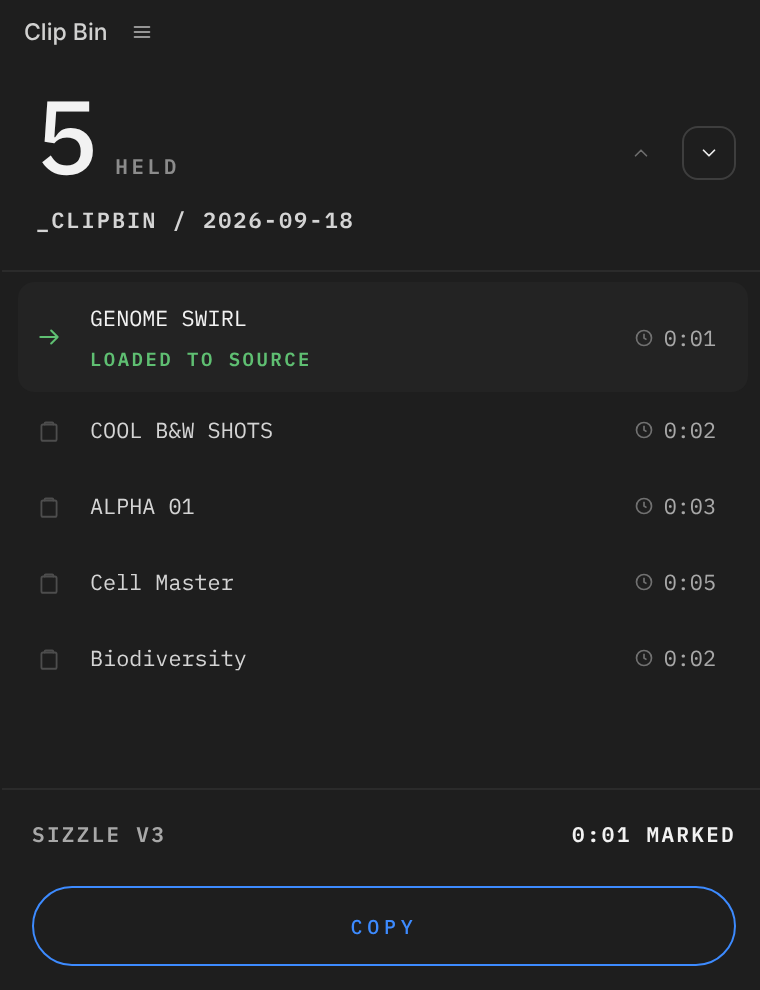
“To me, plugins like Clip Bin are the best kind of DIY tools for video editors because they seek to improve one of the most frequent tasks we all undertake – moving stuff around the timeline.”
What editors use it for
01
Break an interview into subclips
Watch through your IV timeline, mark any significant lines and capture each one. Summarise, rename, and the whole interview becomes a list you can remember, one click from your source monitor.
02
Move a scene in a long-form cut
Mark any scene in your timeline and capture it. It loads straight into your source monitor, ready to insert or overwrite anywhere else in the film. No relying on copy and paste.
03
Pick out the best shots
Capture the ones you like as you find them and give each a memorable name, ready to audition in the cut. No more scrolling back along the timeline wondering where that shot was.
How it works
Why it exists
After more than a decade cutting long-form films in Avid, for Discovery+, Fox, Amazon and Viacom Studios, the thing I missed most whenever I cut in Premiere was copy to clipboard: mark a section, press Alt+C, and it’s in the source monitor, ready to cut from. So I built Clip Bin.
In Premiere you end up keeping the clipboard in your head, until you paste it somewhere. With Clip Bin, every copy loads straight into the source monitor and stays in a list, so you can see what you copied, and then cut it in. Each one is filed in a dated folder, not wherever you last clicked.
The first time I used it on a real job was on a sizzle edit, with less than a day to delivery. The client asked to swap out some shots, so I held twelve replacements in the panel, each renamed with a clear description, and auditioned them in the cut.
No trying to remember where each one lived, and no going back to another timeline or the project panel to find them. The client loved the updated cut, and we delivered on time.
Simon Mackenzie BFE, editor
The obvious questions
Has it been used on real jobs?
Yes. It’s been tested on real jobs by editors in the UK and the US, on Mac and Windows.
Why not just copy and paste?
Because a paste is blind: you only find out what you took when it lands in your cut. Clip Bin puts the section in your source monitor the moment you take it, so you see what you’ve got before it goes anywhere near your edit.
Can't I just pancake two timelines?
For moving between two sequences, yes, and plenty of editors do. It needs screen space you may not have, and it copes badly with a multi-track sequence. It doesn't help inside a single cut, where there's no second timeline to stack.
It's in my source monitor. Then what?
Whatever you'd do with any source clip. Insert or overwrite it at the playhead, drag it into your timeline, or set fresh marks and take a piece of it. The individual clips come in flat, on their own tracks. Switch nesting on in the timeline toolbar if you'd rather drop the section in as one item.
Can I pull sections from an old cut into a new one?
Yes. Open the old cut, mark the section and capture it, and it's in your source monitor, ready to insert or overwrite into the new one. Open it as a timeline from the source monitor's wrench menu if you want to see the tracks.
Will my captures be there tomorrow?
Yes. They’re saved in the project, so close it, come back next week, and they’re still listed. Even after a crash.